Using Currency Rate Import
Preview of currency rates
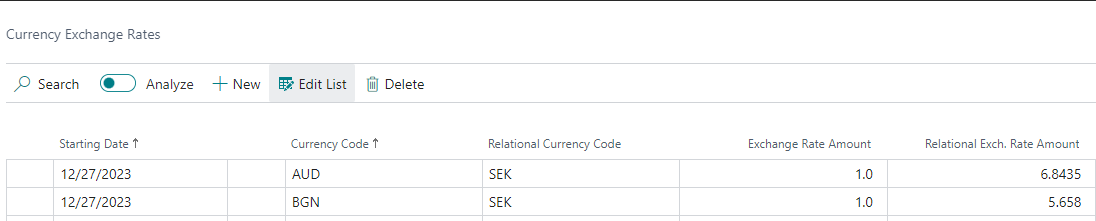
From the Currency Exchange Rate Service card, click "Preview" to view the results of the current currency rate import in a new page.
Manual currency rates import
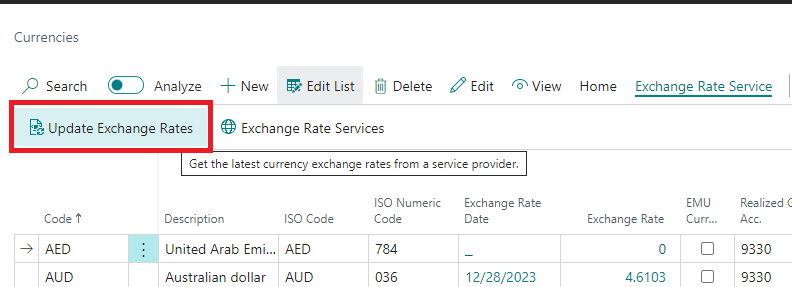
Manually update currency rates by opening the Currency list and selecting the action "Update Exchange Rate." This action uses the enabled Currency Exchange Rate Service.
Automatic currency rates import
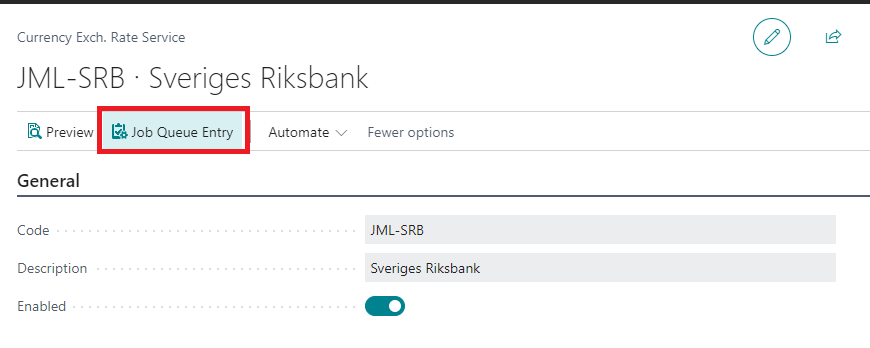
From the Currency Exchange Rate Service card, select the action "Job Queue Entry" to set the frequency and start time for automatic currency import.
Federal Reserve (H.10) publishes weekly, not daily. The Federal Reserve releases H.10 rates every Monday (around 16:15 ET) covering data through the previous Friday. As a result: * An import run mid-week returns rates dated the previous Friday (for example, an import on Wednesday 3 June returns the rate for Friday 29 May). This is expected — H.10 is a certified, audit-grade source, not a real-time feed. * The Starting Date reflects the actual rate observation date; it is not shifted to the import date. * Until the next rate is published, transactions use the most recent available rate (standard Business Central behaviour). Recommendation: Schedule the Federal Reserve Job Queue Entry to run weekly on Monday or Tuesday rather than daily — a daily schedule simply re-imports the same rate. If you need rates dated for the current day, use a real-time provider (such as Open Exchange Rates) instead.
The Federal Reserve service only imports currencies that already exist in your Currencies list. If an expected currency (for example, GBP) does not appear after import, add it to the Currencies list first.
Import Historic Rates (Backfill)
When the scheduled Job Queue fails or is paused for several days, you may need to backfill missing exchange rates for a period. Use the Import Historic Rates feature to import rates for a specific date range.
How to use
-
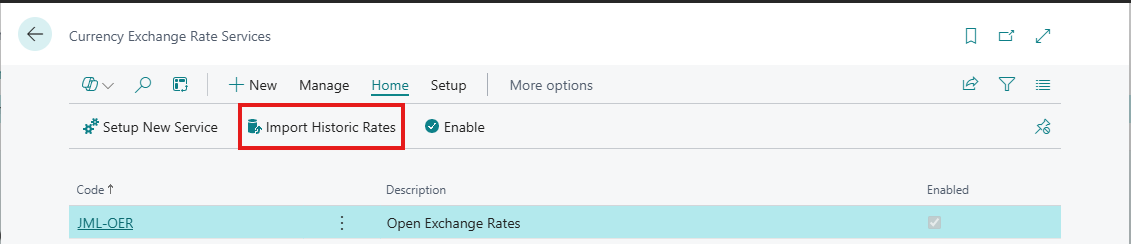
Open Currency Exchange Rate Services list page
-
Click Import Historic Rates action in the ribbon
-
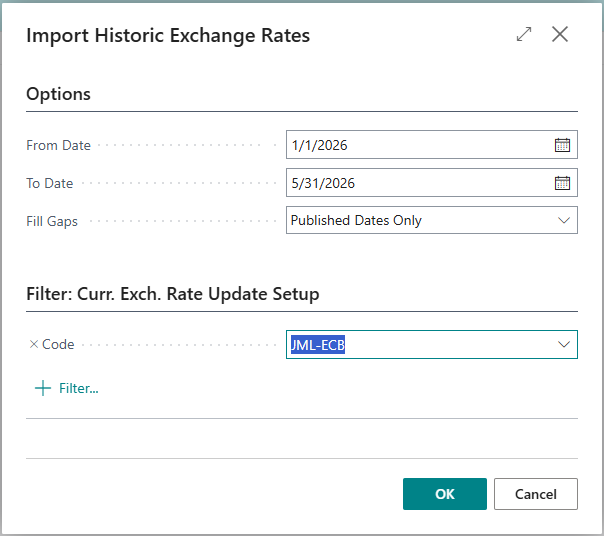
Set the options:
-
Service Code: Select specific service(s) or leave blank for all enabled services
-
From Date (optional): The first date to import rates for (e.g.,
01/01/26). Leave blank to default to one month before today. -
To Date (optional): The last date to import rates for (e.g.,
15/01/26). Leave blank to import through today. -
Fill Gaps (optional): Carry the last known rate forward onto dates that have no published rate. See Fill Gaps below.
-
-
Click OK to start the import
The system will process each date in the selected range and import rates from the configured services.
You can schedule this report on a Job Queue to keep recent rates topped up automatically. Leave From Date and To Date blank when scheduling — each run then imports a rolling window from one month before today through today.
Fill Gaps (carry rates onto empty dates)
National banks publish no exchange rate on weekends and public holidays, so a date with no published rate has no row in the Currency Exchange Rates table. This becomes a problem at period end: when a month-end falls on a weekend — for example, 31 May 2026 is a Sunday — there is no rate dated on the closing date for currency revaluation.
The Fill Gaps option on the Import Historic Rates request page handles this. Real published rates are always imported; this option only adds carried-forward rows on dates that have no published rate, copying the most recent earlier rate:
-
Published Dates Only (default) — only real published rates are imported; no gaps are filled.
-
Month-Ends — additionally fills any month-end date that has no published rate, carrying the previous trading day's rate forward, so period-end revaluation always has a rate dated on the last day of the month.
-
All Dates — additionally fills every empty date in the range (all weekends and holidays).
Example: Importing 01/05/26..31/05/26 with Fill Gaps = Month-Ends imports the real rate for every trading day in May and — because 31 May is a Sunday — also writes a 31 May row carrying the 29 May rate forward, so closing entries dated 31 May have a rate.
[Screenshot: Import Historic Rates request page showing the Fill Gaps option]
Carried-forward rows never overwrite a real published rate, and re-running the import is safe — dates that already have a rate are left unchanged. Only currencies that actually received a rate in the selected range are filled.
For most companies, Month-Ends is the right choice — it guarantees a month-end closing rate without filling every weekend. Use All Dates only if a report or process needs a rate present on every calendar day.
Progress and Results
During import, a progress dialog shows:
-
Current service being processed
-
Current date being imported
After completion, a summary displays:
-
Imported: Number of new rates successfully imported
-
Skipped: Rates that already existed (not overwritten)
-
Warnings: Dates outside service limits or other issues
Provider Historic Data Support
Not all providers support historic data equally:
Fiat Currency Services
-
ECB — 90 days (uses hist-90d.xml feed)
-
Sveriges Riksbank — Unlimited (data since 1993)
-
Bank of England — Unlimited (data since 1975)
-
Danmarks Nationalbank — 5 days only (API limitation)
-
Federal Reserve (H.10) — Unlimited (data back decades; no rates on US market holidays/weekends)
-
Narodowy Bank Polski (NBP) — Unlimited (imported in 93-day windows automatically; archive since 2002)
-
Česká národní banka (CNB) — Unlimited (imported per date; deep history)
-
Banca Națională a României (BNR) — Unlimited (year-file archive; data since 2005)
-
Magyar Nemzeti Bank (MNB) — Unlimited (date-range history back to 1949)
-
Open Exchange Rates — Unlimited (requires paid plan)
Cryptocurrency Services
-
CoinGecko — Unlimited (data since coin inception)
-
CryptoCompare — Unlimited (extensive historical data)
-
CoinMarketCap — Not supported (requires Enterprise plan)
CoinMarketCap does not support historic rate import. The service will be skipped with a warning when processing historic dates.
For bulk historic imports against CoinGecko or CryptoCompare, configure a free Demo / Free-tier API key on the service card's Password / Key field. Without a key, the public rate limit (~5-15 calls/min for CoinGecko) is consumed within the first few days of a multi-coin backfill, after which subsequent dates are silently skipped. See Cryptocurrency Exchange Rate Setup → API Keys & Rate Limits for details.
Danmarks Nationalbank only provides the last 5 trading days via their API. For older dates, you may need to use StatBank or another source manually.
Use Cases
-
Job Queue Recovery: Backfill rates after scheduled import failed
-
New Service Setup: Import historical rates when enabling a new service
-
Data Correction: Re-import rates for a specific period if issues were detected
-
Initial Migration: Populate exchange rates when first setting up the system