Orders Release
When user in Business Central is releasing Order (e.g., press Release in Sales Order card), system can automatically update Shopify fulfillment status.
Configuration
To enable automatic fulfillment updates:
-
Choose the 🔎 icon, enter Shopify Setup, and then choose the related link.
-
On the Sales Order fastTab:
-
Set Export Order Release = Yes

-
-
Press OK to save settings.
How It Works
When Order is Released
-
User opens a Sales Order that was imported from Shopify (has JML Shopify = Yes and JML Shopify Document ID filled)
-
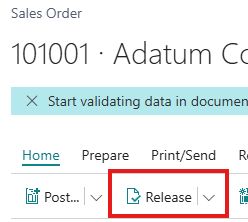
User presses Release button
-
System automatically:
-
Creates fulfillment in Shopify for this order
-
Updates fulfillment status to "Fulfilled"
-
Sends tracking information if available (Shipping Agent Code, Package Tracking No.)
-
Logs the API call in Shopify Log Entries
-
-
Order status in Business Central changes to Released
When Order is Reopened
-
User opens a Released Sales Order from Shopify
-
User presses Reopen button
-
System automatically:
-
Updates fulfillment status in Shopify to "Canceled"
-
Logs the API call
-
Allows editing the order again
-
Important Notes
-
Only works for Sales Orders imported from Shopify (with JML Shopify Document ID)
-
Manual Sales Orders (not from Shopify) are not affected
-
System uses GraphQL API to create/update fulfillments
-
Tracking information is optional but recommended
Adding Tracking Information
To send tracking information to Shopify when releasing order:
-
Open Sales Order
-
On the Shipping fastTab:
-
Set Shipping Agent Code = carrier code (e.g., DHL, FedEx)
-
Set Package Tracking No. = tracking number from carrier

-
-
Press Release
-
Tracking information will be visible in Shopify order fulfillment details
Troubleshooting
Problem: Fulfillment not updated in Shopify
Solution:
-
Check Export Order Release = Yes in Shopify Setup
-
Verify order has JML Shopify Document ID filled
-
Check Shopify Log Entries for API errors
-
Verify API Token has correct scopes (write_orders, write_assigned_fulfillment_orders)
Problem: Error when releasing order
Solution:
-
Open Shopify Log Entries and filter by Type = Error
-
Review error message in Response Data
-
Common errors:
-
"Order already fulfilled" → Order was fulfilled directly in Shopify
-
"Invalid fulfillment" → Order may be canceled or archived in Shopify
-
"Unauthorized" → API Token missing or invalid
-
Problem: Tracking information not sent to Shopify
Solution:
-
Ensure Shipping Agent Code and Package Tracking No. are filled before releasing
-
Check if Shipping Agent Code matches a recognized carrier in Shopify
-
Review Request Data in Shopify Log Entry to verify tracking was included