Sent Notifications
Monitor all the notifications you have sent from a single dashboard. See who has viewed their tasks and track completion.
Activity Cue
The User Tasks Activities area on your Role Center includes a My Sent Notifications cue. This shows the count of open (not yet completed) notifications you have created.
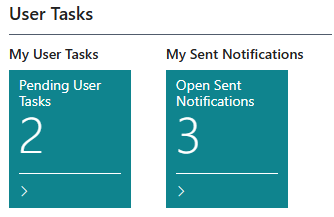
Click the cue to open the My Sent Notifications list.
My Sent Notifications List
The list shows all open notifications you have created that are linked to a source record. It includes:
| Column | Description |
|---|---|
| Title | Source record reference |
| Source | Formatted description of the source record |
| Assigned To User Name | The individual recipient (empty for group tasks) |
| User Task Group Assigned To | The group assignment (empty for individual tasks) |
| Original Group | The original group before claiming |
| Priority | Low, Normal, or High |
| Due DateTime | Deadline, highlighted if overdue |
| Viewed At | When the recipient first opened the task (empty = not yet viewed) |
| Percent Complete | The recipient's progress on the task |
| Created DateTime | When you created the notification |
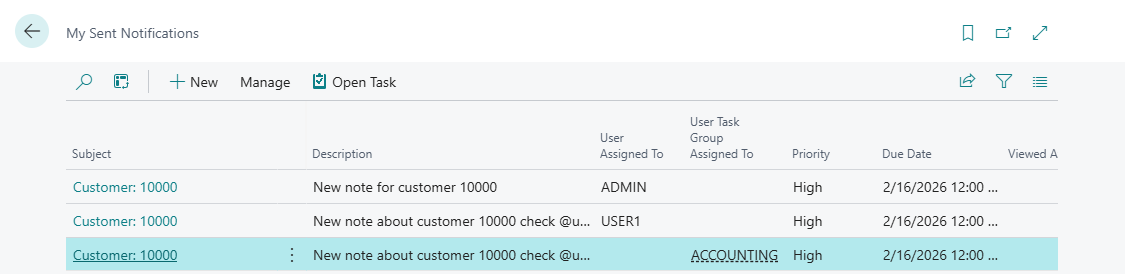
Reading the Viewed At Column
The Viewed At column tells you whether the recipient has seen the notification:
-
Empty - The recipient has not opened the task yet
-
Date and time - The exact moment the recipient first opened the task card
A task showing as "Viewed" does not mean it's been acted upon. Check the Percent Complete column for progress.
Opening a Task
To view the full details of a sent notification:
-
Select a row in the list
-
Click Open Task in the Actions menu (or double-click the row)
-
The User Task Card opens
From the task card you can see the full description, check the source record, and review all task details.
Filtering
The Sent Notifications list automatically filters to show only:
-
Tasks created by you
-
Tasks that are linked to a source record (created through Notify User)
Completed tasks (100% complete) remain visible until they are removed from the system.