Component Ledger
The Component Ledger provides a complete, permanent audit trail of all parts installed in, removed from, or used with assets through Component Entries.

Understanding Component Entries
What is a Component Entry?
Component Entry = Permanent ledger record of a component operation
Created When:
-
Component Journal posted
-
Each journal line creates one Component Entry
-
Permanent, cannot be deleted
Purpose:
-
Complete installation/removal history
-
Maintenance audit trail
-
Compliance documentation
-
Service history
-
Failure analysis
Similar To:
-
Item Ledger Entries (for inventory)
-
Holder Entries (for asset custody)
-
G/L Entries (for accounting)
Entry Types
Install
Purpose: Component added to asset
Quantity: Positive
Examples:
-
Install new hard drive in server
-
Install 4 new tires on vehicle
-
Install air filter in HVAC
Interpretation: Component now in/on asset
Remove
Purpose: Component taken out of asset
Quantity: Negative (typically)
Examples:
-
Remove defective memory module
-
Remove worn brake pads
-
Remove old toner cartridge
Interpretation: Component no longer in asset
Replace
Purpose: Component replaced (combines remove + install)
Quantity: Positive (new component qty)
Examples:
-
Replace oil filter during service
-
Replace defective power supply
-
Replace worn belt
Interpretation: Old component out, new component in
Note: Single entry type for convenience, represents replacement operation
Adjustment
Purpose: Correct component records
Quantity: Can be positive or negative
Examples:
-
Correct quantity after physical audit
-
Fix data entry error
-
Adjust position information
Interpretation: Record correction
Component Entry Fields
Entry No.
Type: Integer
Auto-Assigned: Yes
Unique: Yes
Purpose: Unique identifier for this entry
Usage: Reference in investigations, reports
Asset No.
Type: Code[20]
Required: Yes
Links To: Asset Pro Asset table
Purpose: Which asset this component operation is for
Example: VEH-001, SRV-WEB-01, PRINTER-LAB
Lookup: Opens Asset List
Asset Description (FlowField)
Type: Text[100]
Calculated: Yes
Editable: No
Purpose: Asset name for readability
Auto-Populated: From Asset record
Item No.
Type: Code[20]
Required: Yes
Links To: Business Central Item table
Purpose: Which component (part/item)
Example: FILTER-OIL, HDD-2TB, TONER-BLK
Lookup: Opens Item List
Requirement: Item must exist in BC Item table
Item Description (FlowField)
Type: Text[100]
Calculated: Yes
Editable: No
Purpose: Item name for readability
Auto-Populated: From Item record
Variant Code
Type: Code[10]
Optional: Yes
Links To: Item Variant
Purpose: Specific item variant if applicable
Example: Item "TIRE", Variant "17-INCH"
Entry Type
Type: Enum
Required: Yes
Options: Install, Remove, Replace, Adjustment
Purpose: What operation was performed
Critical: Determines interpretation of quantity and operation
Quantity
Type: Decimal
Required: Yes
Precision: 0-5 decimals
Purpose: How many components
Sign Interpretation:
-
Install: Positive (adding components)
-
Remove: Negative (taking out components)
-
Replace: Positive (new components)
-
Adjustment: Positive or negative (correction)
Example: 4 (four tires installed)
Unit of Measure Code
Type: Code[10]
Links To: Item Unit of Measure
Optional: Yes
Purpose: Unit for quantity
Examples: PCS (pieces), QT (quarts), GAL (gallons)
Default: Item's Base Unit of Measure
Position
Type: Text[50]
Optional: Yes (but recommended)
Purpose: Physical location within asset
Examples:
-
"Front Left Wheel"
-
"Disk Bay 3"
-
"Slot A1"
-
"Engine Compartment"
-
"Cartridge Tray 1"
Benefit: Precise tracking, faster maintenance
Serial No.
Type: Code[50]
Optional: Yes
Purpose: Serial number for serialized components
Examples:
-
Hard drive: HDD-SN-8472947
-
Memory: MEM-12345678
-
Battery: BAT-SN-2024-001
When to Use:
-
Serialized parts
-
Warranty tracking
-
Expensive components
-
RMA requirements
Lot No.
Type: Code[50]
Optional: Yes
Purpose: Lot/batch number
Examples:
-
Filter lot: LOT-2024-Q1-001
-
Oil batch: BATCH-5W30-2024
When to Use:
-
Lot-tracked items
-
Quality control
-
Recall management
Posting Date
Type: Date
Required: Yes
Purpose: When component operation occurred
Usage: Historical tracking, maintenance schedules
Example: 2024-03-15
Reason Code
Type: Code[10]
Optional: Yes (recommended)
Links To: BC Reason Code
Purpose: Why component operation happened
Common Codes:
-
MAINTENANCE - Scheduled maintenance
-
REPAIR - Repair/replacement
-
FAILURE - Component failure
-
UPGRADE - Component upgrade
-
RECALL - Manufacturer recall
-
AUDIT - Inventory audit adjustment
Document Type
Type: Enum
Optional: Yes
Purpose: Source document type
Options: Component Journal, Item Journal (future), etc.
Document No.
Type: Code[20]
Optional: Yes
Purpose: Source document number
Example: COMP-JNL-2024-001, WO-12345 (work order)
Usage: Link to source, group related operations
External Document No.
Type: Code[35]
Optional: Yes
Purpose: External reference
Examples:
-
Work Order: WO-2024-12345
-
Service Ticket: TICKET-8472
-
Purchase Order: PO-VEN-001
-
RMA: RMA-VENDOR-789
Benefit: Complete traceability to external systems
Transaction No.
Type: Integer
Auto-Assigned: Yes
Purpose: Group related entries
Usage: Future - link related operations (e.g., remove + install in replace)
User ID
Type: Code[50]
Auto-Assigned: Yes
Editable: No
Purpose: Who created this entry
Usage: Audit trail, accountability
Example: MAINTENANCE-USER-1
Viewing Component Entries
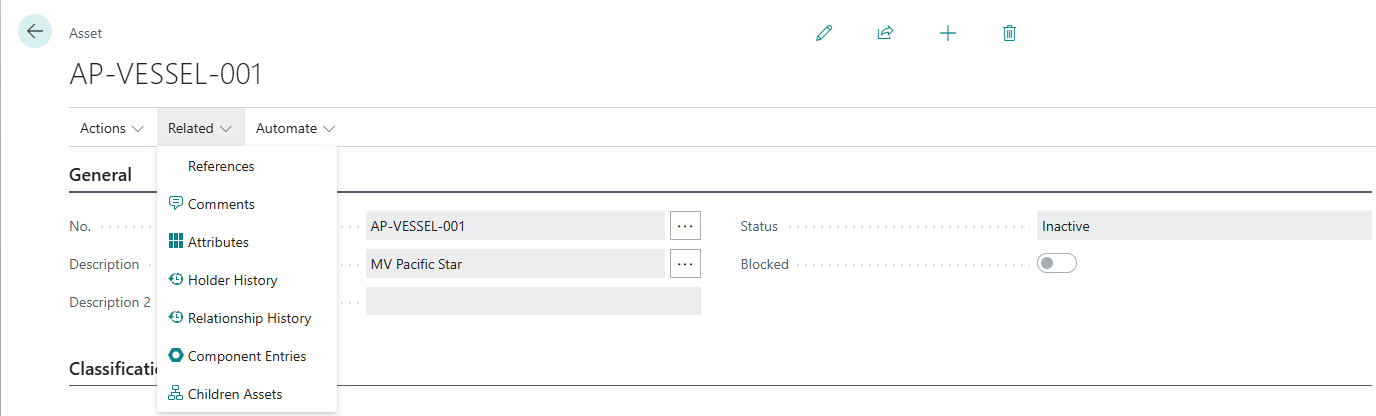
From Asset Card
Step 1: Open Asset Card
Step 2: Click Actions → Component Entries
Step 3: Component Entries page opens, filtered to this asset
Result: All components for this asset
From Component Entries Page
Method 1: Direct Search
-
Press Alt+Q
-
Enter "Component Entries"
-
Choose related link
-
Page opens (all entries)
Method 2: From Role Center
-
Navigate: Maintenance → Component Entries
-
Page opens
Filtering Component Entries
By Asset:
-
Filter: Asset No. = VEH-001
-
Shows: All components for vehicle VEH-001
By Item:
-
Filter: Item No. = FILTER-OIL
-
Shows: All uses of oil filters
By Date Range:
-
Filter: Posting Date = 01/01/2024..03/31/2024
-
Shows: Q1 component operations
By Entry Type:
-
Filter: Entry Type = Install
-
Shows: All installations
By Reason:
-
Filter: Reason Code = MAINTENANCE
-
Shows: Scheduled maintenance operations
Combined Filters:
-
Asset = VEH-001 AND Posting Date = Last 30 Days
-
Shows: Recent operations on vehicle
Component History Analysis
Current Component Configuration
Question: "What components are currently installed in Server SRV-001?"
Method:
-
Filter: Asset No. = SRV-001
-
Group by Item No.
-
Sum: Install/Replace entries (positive)
-
Subtract: Remove entries (negative)
-
Result = Current installed quantity
Example:
-
Hard Drive HDD-2TB: 4 Install entries - 1 Remove entry = 3 currently installed
-
Memory MEM-8GB: 8 Install entries = 8 currently installed
Future Enhancement: Calculated field for "Current Qty"
Maintenance Timeline
Question: "What's the maintenance history for Vehicle VEH-001?"
Method:
-
Filter: Asset No. = VEH-001
-
Sort by: Posting Date (ascending)
-
View chronologically
Result: Timeline view
Example:
2024-01-15: Oil Filter (Replace) - Reason: MAINTENANCE 2024-01-15: Engine Oil (Install, 5 QT) - Reason: MAINTENANCE 2024-02-20: Brake Pads (Replace, 4 PCS) - Reason: REPAIR 2024-03-15: Air Filter (Replace) - Reason: MAINTENANCE
Component Failure Analysis
Question: "How often do Hard Drives fail?"
Method:
-
Filter: Item No. = HDD-2TB
-
Filter: Reason Code = FAILURE
-
Count entries
-
Date range: Last 12 months
-
Calculate: Failures per month
Result: Failure rate data
Use: Vendor evaluation, preventive replacement scheduling
Consumable Usage
Question: "How many oil filters used this quarter?"
Method:
-
Filter: Item No. = FILTER-OIL
-
Filter: Entry Type = Install OR Replace
-
Date range: Q1 2024
-
Sum Quantity
Result: 45 filters (example)
Use: Purchase planning, budget analysis
Serial Number Tracking
Question: "Where is Hard Drive with Serial HDD-12345?"
Method:
-
Filter: Serial No. = HDD-12345
-
Find latest Install or Replace entry
-
Asset No. shows current location
Result: Asset SRV-WEB-01
Use: Warranty claims, RMA tracking, asset location
Component Entries vs. Item Ledger Entries
Component Entries: Track components IN RELATION TO ASSETS
Item Ledger Entries: Track inventory movements
| Aspect
|
Component Entries
|
Item Ledger Entries
| | --- | --- | --- | |
Focus
|
Asset-component relationship
|
Inventory transactions
| |
Tracks
|
Installed where, when
|
Qty on hand, cost
| |
Key Field
|
Asset No.
|
Location, Bins
| |
Purpose
|
Maintenance history
|
Inventory control
| |
Example
|
"Filter installed in Vehicle VEH-001"
|
"50 filters in warehouse"
|
Both Can Exist: Installing component CAN create both (if integrated)
Currently: Component Entries separate (inventory integration future)
Reporting Use Cases
Maintenance Schedule Compliance
Report: Scheduled maintenance completion
Method:
-
Filter: Reason Code = MAINTENANCE
-
Group by: Asset No., Month
-
Verify: All assets serviced per schedule
Output: Compliance report
Component Lifecycle
Report: Component lifespan from install to remove
Method:
-
Filter: Item No. = specific component
-
Match: Install entry (date1) with Remove entry (date2) for same Asset + Position
-
Calculate: date2 - date1 = Lifespan
Output: Average component lifespan
Use: Replacement scheduling, vendor evaluation
Warranty Tracking
Report: Components under warranty
Method:
-
Filter: Item No. = warranty-tracked item
-
Filter: Entry Type = Install
-
Calculate: Posting Date + Warranty Period = Warranty Expiry
-
Filter: Warranty Expiry > Today
Output: Components still under warranty
Cost Analysis
Report: Component costs per asset
Method:
-
Filter: Asset No. = specific asset
-
Join: Component Entry → Item → Unit Cost
-
Sum: Quantity × Unit Cost
Output: Total component cost for asset
The Component Ledger is your complete maintenance history. Use it to analyze failure patterns, schedule preventive maintenance, track warranty coverage, and ensure compliance. Export to Excel for advanced analysis and trending!