Classifications
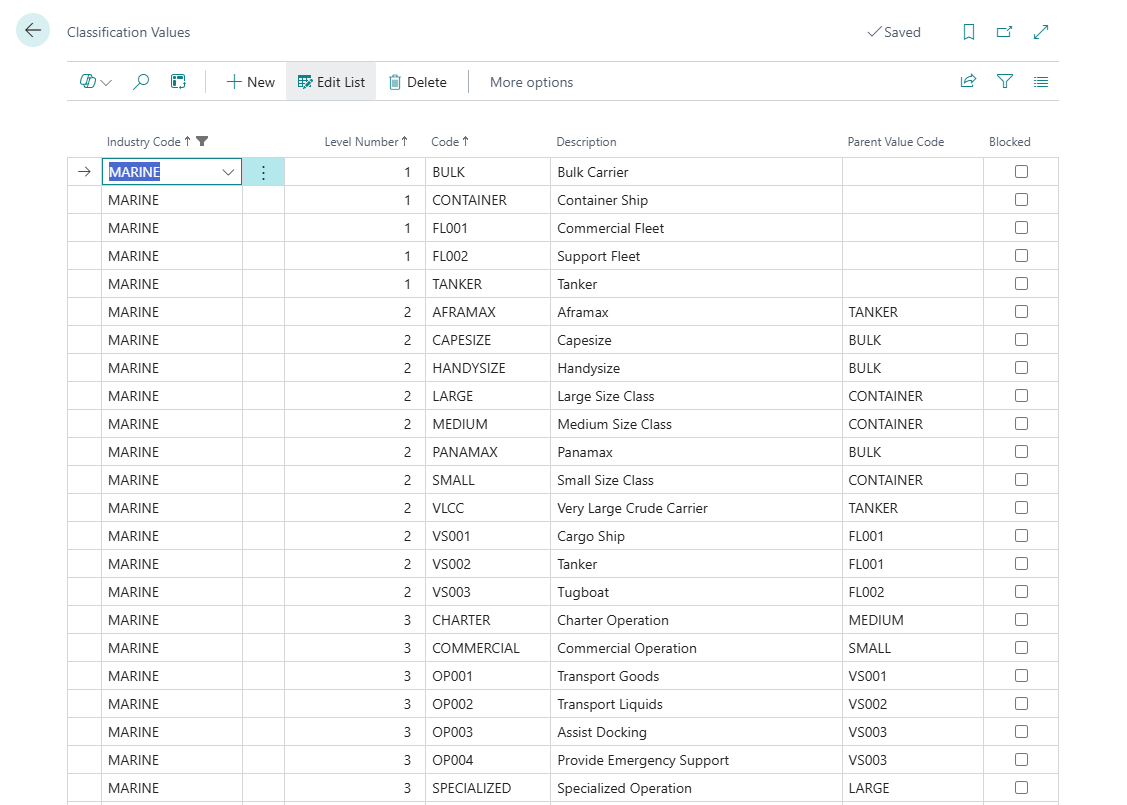
Classifications provide hierarchical categorization for assets within an industry. Build custom taxonomy with levels (Type → Category → Model) and values with parent-child relationships.
Classification Structure
Two components:
Classification Levels
Define hierarchy structure (max 50 levels per industry)
Example levels:
-
Level 1: Fleet Type
-
Level 2: Vessel Category
-
Level 3: Vessel Model
Classification Values
Specific options within each level, linked by parent-child relationships
Example values:
Level 1: COMMERCIAL (Commercial Vessels) Level 2: CARGO (Cargo Ships) → parent: COMMERCIAL Level 3: PANAMAX (Panamax Bulk Carrier) → parent: CARGO
Creating Classification Levels
Access Levels Page
-
Choose 🔎 icon
-
Enter Asset Industries
-
Choose related link
-
Open Industries list page
-
Select Industry, press Classification Levels
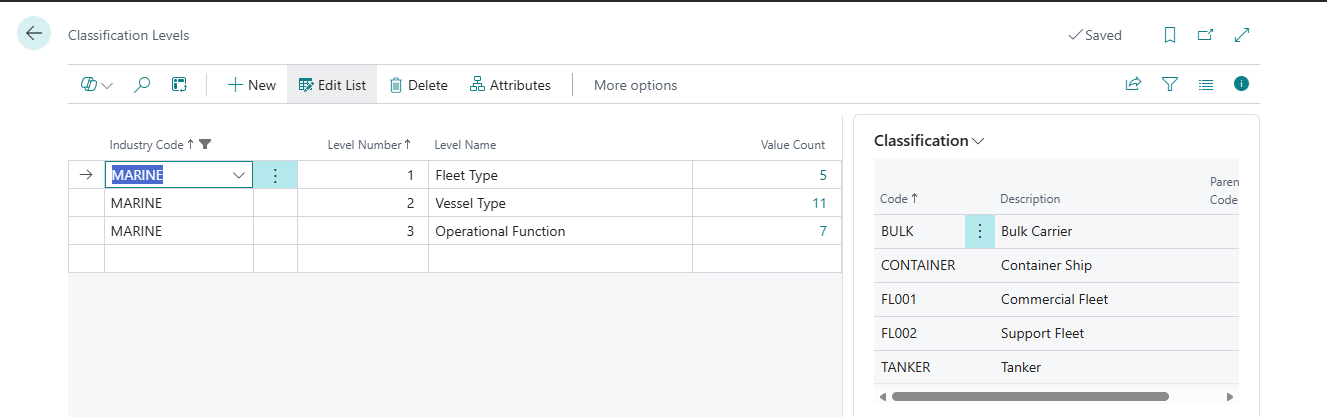
Level Fields
Industry Code (required)
-
Select industry (FLEET, MEDICAL, IT)
-
Cannot change after creation
Level Number (required)
-
Sequential: 1, 2, 3, 4...
-
Level 1 = root level
Level Name (required, max 50 characters)
-
Descriptive name for this level
-
Examples: "Fleet Type", "Vessel Category", "Device Model"
-
Use terminology your organization understands
Value Count (calculated)
-
Number of values/assets defined for this level
-
Updates automatically
Example: Fleet Industry Levels
Level 1:
-
Industry Code: FLEET
-
Level Number: 1
-
Level Name: Fleet Type
-
Parent Level Number: 0
Level 2:
-
Industry Code: FLEET
-
Level Number: 2
-
Level Name: Vessel Category
-
Parent Level Number: 1
Level 3:
-
Industry Code: FLEET
-
Level Number: 3
-
Level Name: Vessel Model
-
Parent Level Number: 2
Creating Classification Values
Access Values Page
-
Choose 🔎 icon
-
Enter Asset Industries
-
Choose related link
-
Open Industries list page
-
Select Industry, press Classification Values
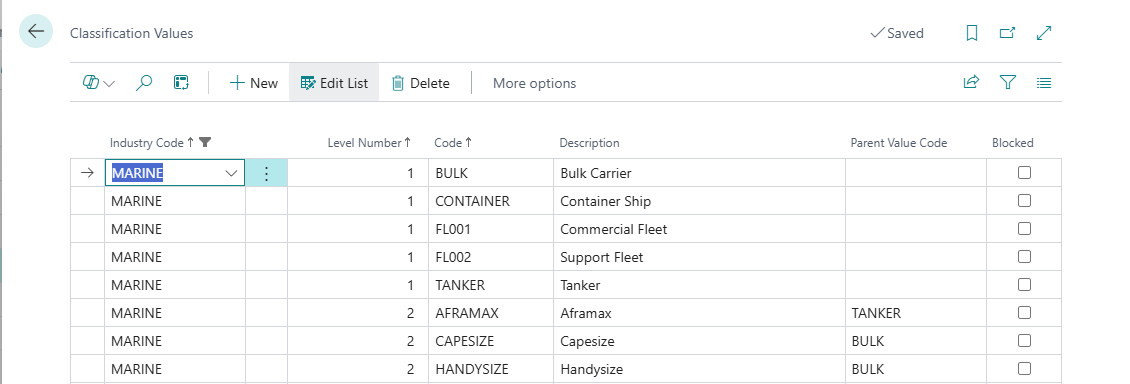
Value Fields
Industry Code (required)
- Must match classification level
Level Number (required)
-
Select which level (1, 2, 3, etc.)
-
Must have level created first
Code (required, max 20 characters)
-
Unique identifier: COMMERCIAL, CARGO, PANAMAX
-
Uppercase recommended
-
Cannot change after assets use it
Description (max 100 characters)
-
Full name: "Commercial Vessels", "Cargo Ships"
-
Shown to users
Parent Value Code (required for Level 2+)
-
Select parent from previous level
-
Level 1: Leave blank (no parent)
-
Level 2+: Must specify parent
Blocked (checkbox)
-
Prevents new assets using this value
-
Existing assets unaffected
Asset Count (calculated)
-
Number of assets using this value
-
Leaf nodes only (deepest level)
Example: Fleet Industry Values
Level 1 Values (no parent):
COMMERCIAL | Commercial Vessels FISHING | Fishing Vessels PASSENGER | Passenger Vessels
Level 2 Values (parent required):
CARGO | Cargo Ships | parent: COMMERCIAL TANKER | Tankers | parent: COMMERCIAL TRAWLER | Trawlers | parent: FISHING FERRY | Ferries | parent: PASSENGER
Level 3 Values (parent required):
PANAMAX | Panamax Bulk Carrier | parent: CARGO VLCC | Very Large Crude Carrier | parent: TANKER AFRAMAX | Aframax Tanker | parent: TANKER
Parent-Child Relationships
Rules:
Level 1: No parent (root level)
Level 2+: Must have parent from previous level
Example hierarchy:
FLEET Industry ├─ Level 1: Fleet Type │ ├─ COMMERCIAL │ ├─ FISHING │ └─ PASSENGER ├─ Level 2: Vessel Category │ ├─ CARGO → parent: COMMERCIAL │ ├─ TANKER → parent: COMMERCIAL │ ├─ TRAWLER → parent: FISHING │ └─ FERRY → parent: PASSENGER └─ Level 3: Vessel Model ├─ PANAMAX → parent: CARGO └─ VLCC → parent: TANKER
On Asset Card:
-
Select Fleet Type: COMMERCIAL
-
Vessel Category filtered to: CARGO, TANKER (only children of COMMERCIAL)
-
Select Vessel Category: CARGO
-
Vessel Model filtered to: PANAMAX (only child of CARGO)
Asset Assignment
Assets classified at deepest level only:
Example:
-
Industry: FLEET
-
Fleet Type: COMMERCIAL
-
Vessel Category: CARGO
-
Vessel Model: PANAMAX
Asset assigned to PANAMAX only (Level 3). The full path (COMMERCIAL → CARGO → PANAMAX) is implied through parent relationships.
Filtering:
-
Filter by Fleet Type = COMMERCIAL: Shows all COMMERCIAL vessels (including CARGO → PANAMAX)
-
Filter by Vessel Category = CARGO: Shows all CARGO ships (including PANAMAX)
-
Filter by Vessel Model = PANAMAX: Shows only PANAMAX vessels
Common Patterns
Pattern 1: Simple 2-Level Structure
IT Assets:
Level 1: Device Type
- DESKTOP, LAPTOP, SERVER, NETWORK
Level 2: Model
- DELL-7490 → parent: LAPTOP
- HP-ELITE → parent: DESKTOP
- CISCO-2960 → parent: NETWORK
Pattern 2: Deep 4-Level Structure
Manufacturing:
Level 1: Division
- PRODUCTION, QUALITY, PACKAGING
Level 2: Equipment Type
- ASSEMBLY → parent: PRODUCTION
- TESTING → parent: QUALITY
Level 3: Manufacturer
- SIEMENS → parent: ASSEMBLY
- FLUKE → parent: TESTING
Level 4: Model
- PLC-S7-1500 → parent: SIEMENS
- DMM-8845A → parent: FLUKE
Pattern 3: Flat 1-Level Structure
Rental Equipment:
Level 1: Equipment Category
- GENERATORS, COMPRESSORS, SCAFFOLDING, TOOLS
No Level 2 - assets directly assigned to Level 1 categories
Modifying Classifications
Adding Levels
-
Can add new levels anytime
-
Add to end of hierarchy (Level 4, Level 5, etc.)
-
Cannot insert between existing levels
Adding Values
-
Can add values anytime
-
Specify correct parent
-
No limit on value count
Deleting Values
-
Cannot delete if assets use it
-
Cannot delete if child values exist
-
Delete children first, then parent
Blocking Values
-
Check Blocked box
-
Prevents new assets
-
Existing assets unaffected
-
Use instead of deletion when assets exist
Related Topics
See Also:
-
Industries - Create industry containers first
-
Attributes - Add custom fields to classifications
-
Asset Management - Assign classifications to assets
-
AI Setup Wizard - Generate classifications automatically
Next in Configuration: Learn how to create custom attributes for your assets.